Global Script Import
2 minute read
Script-based inventories exist in Docusnap. Here, the inventory is executed locally on a system via an executable file and the inventoried information is saved in a file.
To not have to create a separate script import job for each company and domain, the global script import can be used. This allows scripts for several companies to be imported simultaneously with one job.
Storing Structure on the File System
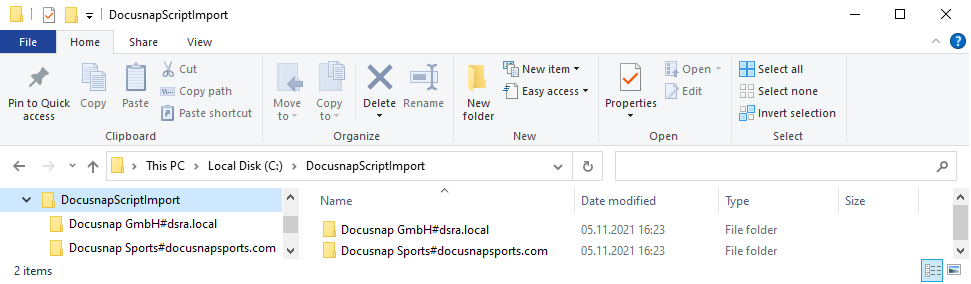
The prerequisite for simultaneous import is the following structure within the file system:
1st level: Root directory E.g. DocusnapScriptImport (name is freely choosable)
2nd level: Company#Domain.FQDN E.g. Docusnap Sports#docusnapsports.com
3rd level: Storage of files
Import
Files can be imported into Docusnap via the Global Script Import.
The wizard is located in the following ribbons
- Discovery - All wizards - Global script import
- Inventory - All Wizards - Global Script Import
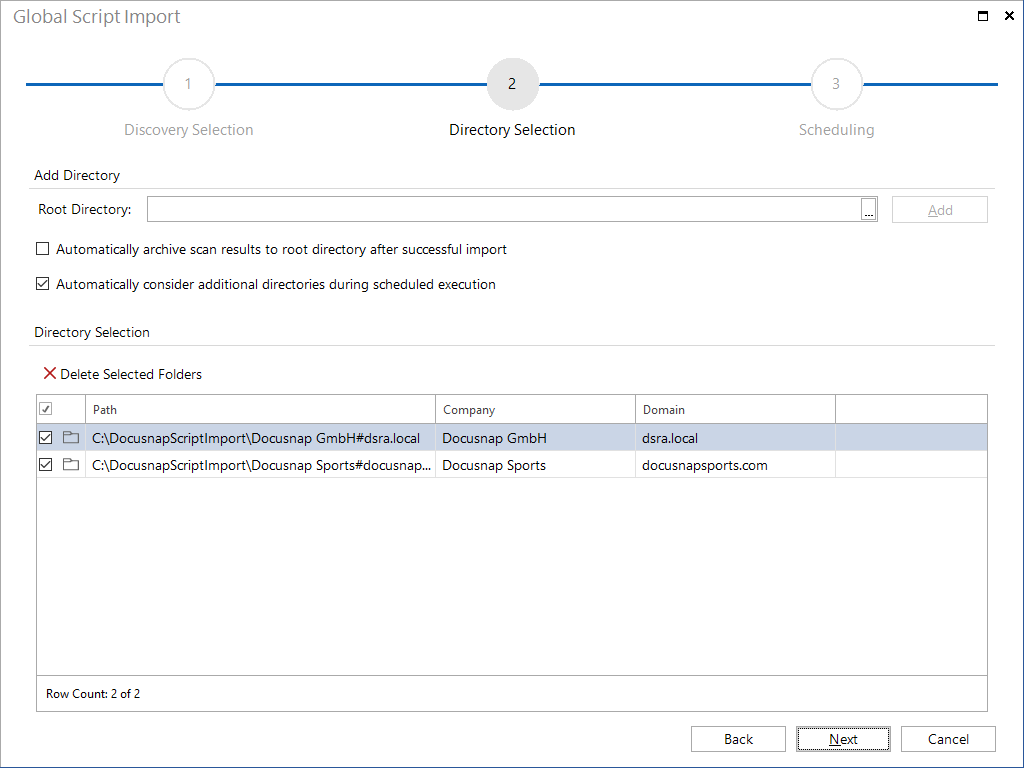
- All jobs - All wizards - Global script import In the first step, select the appropriate discovery service. When selecting the discovery service, make sure that it has access to the path or paths defined in the next step.
When selecting the directory, the root directory is determined - the appropriate subfolders must be located under it, according to the scheme described previously.
Optionally, the scan results can be archived (otherwise they will be deleted after import). In case of timed execution, directories newly added to the folder structure are taken into consideration.
When scheduling automatic import, it is important that the user running the Discovery Service has read and write access to the specified root directory and below.